You're travelling, paying for your hotel in a foreign currency, and you photograph the receipt in Flex's new mobile app. The app reads the currency, fetches the current exchange rate, and calculates the amount in your base currency — instantly, without any action on your part.
In Flex HRM, you can register expenses in foreign currency, but until now you have had to enter the currency code and amount manually. This takes unnecessary time and opens the door to errors in expense reporting.
The new mobile app takes it a step further. When you photograph a receipt in a foreign currency, the app interprets the currency directly from the receipt. The following then happens automatically:
- The currency code is identified automatically — for example EUR or USD.
- The current exchange rate is retrieved and displayed clearly in the expense view.
- The total amount shows the interpreted amount in the currency you paid with.
- The app also clearly shows how much you will be reimbursed, and which exchange rate the calculation is based on.
Exchange rates are updated once per day, just as in Flex HRM.
In the expense view, you can see the fields the app has filled in for you. In the example below, a receipt in EUR has been scanned by a Swedish company with Swedish kronor (SEK) as the base currency:
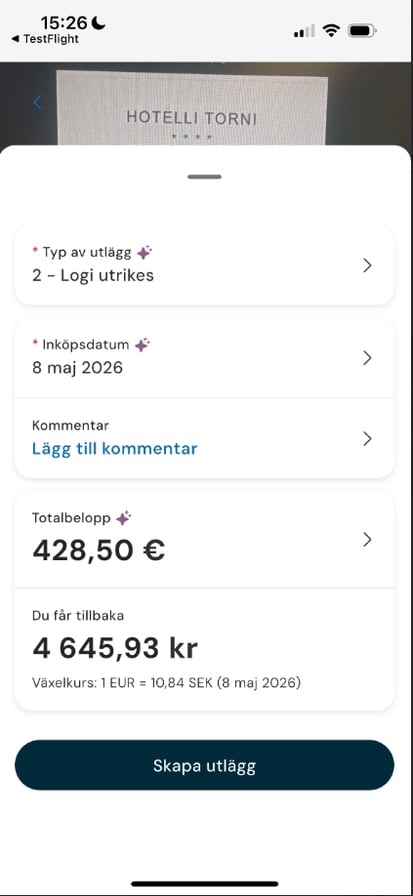
All of this is filled in automatically. You do not need to perform a single calculation.
If the app has interpreted the currency code or amount incorrectly, you can easily correct the details manually before saving. The feature is there to support you, not get in your way — you always retain full control over your expenses.
Currency interpretation on expenses is one step on the road to full functionality in the new mobile app. The app has been built from the ground up based on your requests, and delivers a faster, simpler and smarter experience — wherever you are.
Log in to the app and try it next time you need to report an expense in a foreign currency.