Managing and exporting your reports in Flex HRM is now easier than ever! We have expanded the functionality within the report package feature to increase automation and save you valuable time.
Save to remote folder
Previously, report files had to be downloaded individually via your web browser. You can now export an entire report package directly to a remote folder. This provides great opportunities for automation and seamless integration with external systems and stakeholders. If you have permission to create report packages, you can specify the remote folder as soon as your package is created.
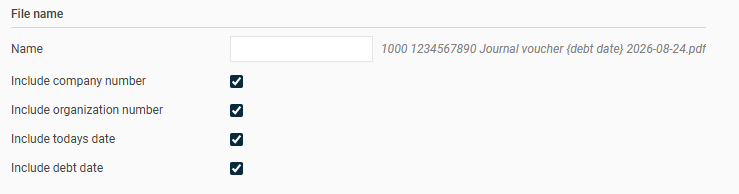
Expanded Options for Automatic File Name Affixes
The following automatic options are now available depending on the report type:
- Payment Date: Available for Bank List, Payroll Specification, Allocation of Number and Amount, Payslip, and custom reports created in the report generator using Payroll Transactions as the data source.
- Debt Date: Available for reports built in the report generator using Holiday Debt, ATK/ATF Debt, or Accumulator Debt data sources.
- Accounting Date: Can now be selected for Journal Vouchers.
- Organization Number: Can now be included in the file name for all reports.
Directly beside these options, a live preview shows you exactly how the final file name will look.